
How can I enroll my Mid-Market or Enterprise business account in Paperless Billing?
Enrolling your Mid-Market or Enterprise business account for Paperless Billing is easy through SpectrumEnterprise.
You can register for SpectrumEnterprise.net with the account number and security code found on your Spectrum Business bill at spectrumenterprise.net/
If you’re already registered for SpectrumEnterprise.
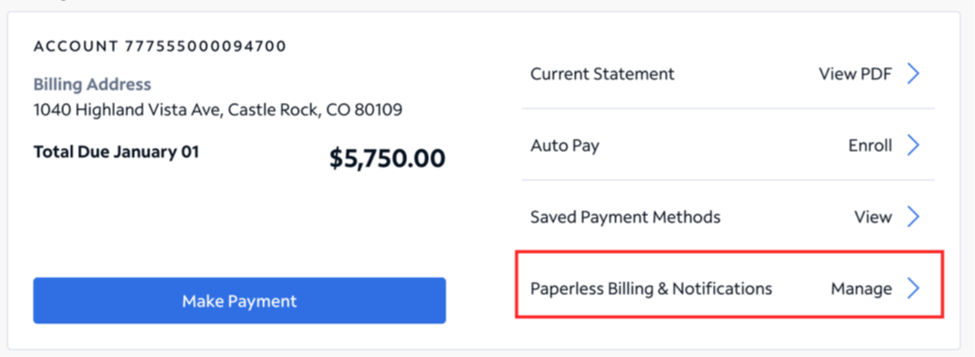
- Sign in and navigate to Billing
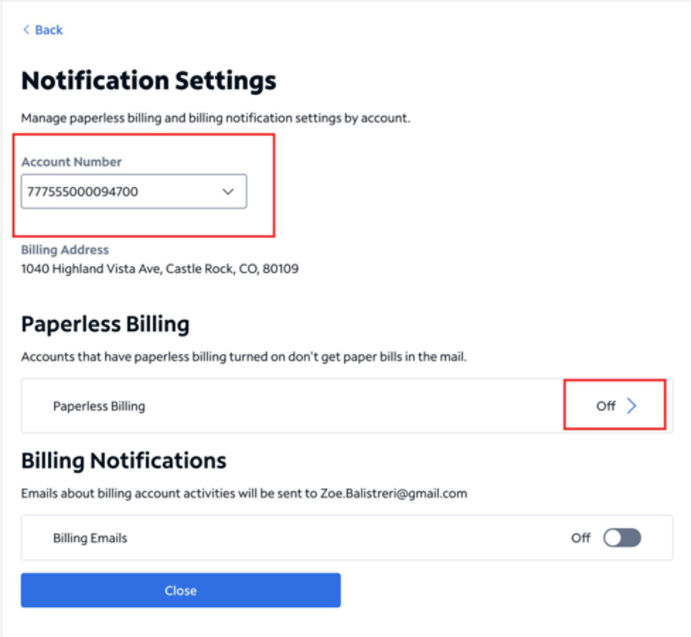
- Select the account you want to enroll
- Click on Paperless Billing & Notifications
- Toggle Paperless Billing ‘On’
If you want to receive an email notification when a new bill is posted to your online account, you can turn on Billing Emails from this same screen.
Your Mid-Market or Enterprise business account should be an 8- or 9-digit account number.
If you're looking to enroll a 16-digit account number for paperless billing, please use one of the options below.
Payors that manage billing for multiple organizations will need to use different email addresses to register for each organization.
Residential support
Find instructions for enrolling your residential account in paperless billing at Paperless Billing | Spectrum Support
Small Business support
Learn how to make your small business account paperless at Paperless Billing | Spectrum Business Support
Community Solutions support
Learn about choosing how to receive your Community Solutions bill at Signing Up for Paper Statements | Spectrum Community Support.